Posts

Email Messaging from Salesforce

SingleEmailMessage  &  MassEmailMessage  classes are provided by Salesforce, which can be used to send an email or email in bulk to the users. First of all we need to create a  Helper class ,we will call this class using Trigger, whenever the condition met, the trigger will call this Helper class, and all the stuffs whatever we are doing, will be in helper class. We are using an email template too. Here is the Helper class named  "HelperContactTrigger" public with sharing class HelperContactTrigger { //static method public static List  sendEmail(List  contacts) { //query on template object EmailTemplate et=[Select id from EmailTemplate where name=:'Sales: New Customer Email']; //list of emails List  emails = new List (); //loop for(Contact con : contacts){ //check for Account if(con.AccountId == null && con.Email != null){ //initiallize messaging method Messaging.SingleEmailMessage singleMail = new Messaging.SingleEmailMessa...
Slaesforce Triggers

Image
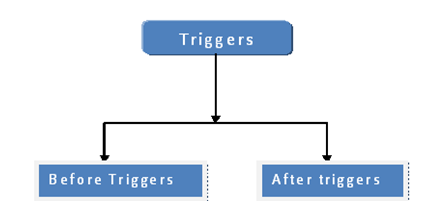
What is Apex Triggers ? A Trigger is Apex code that executes before or after the following types of operations: insert update delete merge upsert undelete Types of Apex Triggers Before Triggers: Before triggers can be used to update or validate record values before they are saved to the database. After Triggers: After triggers can be used to access field values that are set by the database (such as a record's Id or last Updated field), and to affect changes in other records, such as logging into an audit table or firing asynchronous events with a queue. Example : before insert, after insert, before update, after update, before delete, after delete Syntax of Trigger Important Points- Bulkify your Code : Use Looping through Trigger’s collections variables instead of process through particular indexing. All triggers are bulk triggers by default, and can process multiple records at a time. Bulk triggers can handle both single record updates and bulk ...

Batch Apex

What is batch class? Batch class is just similar to Apex class except that batch class includes the Salesforce provide interface “Database.Batchable”. Why we use batch class? When we want to perform DML operations for bulk records or hit the web service then batch class comes in the picture. Database.Batchable interface contains three method. Start Execute Finish Start Method       global Database.QueryLocater start(Database.BatchableContext bc) {} Use this method to get the records from database or object to be passed to “Execute” method. This method returns Database.QueryLocater object that contains the records. Query fired in the start method will return maximum 5,000,0000 records in a transaction. Execute Method            global void execute(Database.BatchableContext bc , List  scope) {} This method is used for do all the processing for data. This method takes two arguments. A reference of Da...

XML file in Apex Class

public with sharing class domXmlParsing { //method to parse xml file public static string walkThrough(){ //XML string to parse String response = '<S:Envelope xmlns:S="http://schemas.xmlsoap.org/soap/envelope/">' + '<S:Body>' + '<wss:createPendingTicketResponse xmlns:wss="http://www.boomi.com/connector/wss">' + '<wss:createPaymentTransctionLogResponse/>' + '<PendingTicket xmlns:pay="http://www.boomi.com/v1b/Payment">' + '<pay:Response>' + '<pay:R10TillID>test001</pay:R10TillID>' + '<pay:R10SequenceNumber>test002</pay:R10SequenceNumber>' + '<pay:SFTnxId>test003</pay:SFTnxId>' + '<pay:R10TnxID>' + 'TESTME' + '</pay:R...

Custom button on Opportunity to clone opportunity with its related List (object)

Create a new Detail Page Button on the Opportunity object. Set Behavior to Execute JavaScript and Content Source to OnClick JavaScript Paste the Below snippet of code in the window {!REQUIRESCRIPT("/soap/ajax/39.0/connection.js")}  {!REQUIRESCRIPT("/soap/ajax/39.0/apex.js")}  var retStr;  retStr = sforce.apex.execute(" CloneOpportunitywithRelatedObject "," cloneOpportunity ",  {oppId:"{!Opportunity.Id}"});  location.replace('/' + retStr);   Create a new Apex class and paste the below snippet of code global class  CloneOpportunitywithRelatedObject  {     webservice static Id  cloneOpportunity (Id oppId) //  pass parameters     {         List < Related_Object__C > relatedList = new List < Related_Object__C > ();   // query all the fields you need...

Trigger to update latest due date of task on Opportunity

Create a new custom field on opportunity called  Update_Due_Date_of_Task__c (Date/Time) and create the below trigger on task object.  Output : If there are multiple tasks on opportunity the above custom field will be updated by due date which is greater from all task's due date. Trigger updateLastActvtyUpdateOnOpty on Task(after update, after insert) {     Datetime lastUpdatedDate;     Set < String > whatIDs = new Set < String > ();     for (Task tskObj: Trigger.new) {         if (tskObj.whatId != null && tskObj.ActivityDate != null) {             whatIDs.add(tskObj.whatId);         } ...

URL hacking to auto populate fields on click of button

Hi Developers !!. This post is regarding the   Custom Button   on  Opportunity  Object which  will help us to create cloned opportunities and auto populate fields with its Line items with the help of URL hacking  Please follow the below steps: 1. Go to setup. 2. Create new detail page button on Opportunity object. 3. Give the Label for button. 4. Set behavior as  'Execute JavaScript'  and Content Source as  'OnClick JavaScript' . Paste the below snippet of code in your window. {!REQUIRESCRIPT("/soap/ajax/29.0/connection.js")}  {!REQUIRESCRIPT("/soap/ajax/29.0/apex.js")}  var  urlhack = "{!URLFOR( $Action.Opportunity.Clone , Opportunity.Id, [cloneli=1,opp11='Unqualified',CFID (Give id of the custom field)=Opportunity.Name])}";  window.open( urlhack ); 5. Go to opportunity layout and add new button in the layout.

Setting a default 'From' address when sending an email from Cases

global class EmailPublisherLoader implements QuickAction.QuickActionDefaultsHandler { // Empty constructor global EmailPublisherLoader() { } public string customLabelValue{get;set;} // The main interface method global void onInitDefaults(QuickAction.QuickActionDefaults[] defaults) { QuickAction.SendEmailQuickActionDefaults sendEmailDefaults = null; // Check if the quick action is the standard Case Feed send email action for (Integer j = 0; j < defaults.size(); j++) { if (defaults.get(j) instanceof QuickAction.SendEmailQuickActionDefaults && defaults.get(j).getTargetSObject().getSObjectType() == EmailMessage.sObjectType && defaults.get(j).getActionName().equals('Case.Email') && defaults.get(j).getActionType().equals('Email')) { sendEmailDefaults = (QuickAction.SendEmailQuickActionDefaults)defaults.get(j); ...

Custom Button to take Ownership for Case Record

Create a new Detail Button on the Case object. Set Behavior to Execute JavaScript and Content Source to OnClick JavaScript Paste the Below snippet of code in the window  {!REQUIRESCRIPT("/soap/ajax/13.0/connection.js")}  var caseObj = new sforce.SObject("Case");  caseObj.Id = '{!Case.Id}';  caseObj.OwnerId = '{!$User.Id}';  var result = sforce.connection.update([caseObj]);  if (result[0].success=='false') {  alert(result[0].errors.message);  }  else {  href= "https://cs16.salesforce.com/ui/support/servicedesk/ServiceDeskPage#/{!Case.Id}" ;  // return to console document.location.reload(true)               // Refresh the Tab } Note : Change the return URL    to Current URL. Enjoy Coding !!

Custom Button for Cloning Opportunity without items.

Image
Hi Developers !!. This post is regarding the   Custom Button   on Opportunity Object which  will help us to create clone opportunities without Line items with default values. Please follow the below steps: 1. Go to setup. 2. Create new custom button for Opportunity object. 3. Give the Label for button. 4. Set behavior as 'Execute JavaScript' and Content Source as 'OnClick JavaScript' . Paste the below snippet of code in your window. try { { !REQUIRESCRIPT("/soap/ajax/14.0/connection.js") } // Below query will helps you to copy all the fields from your opportunity. var result = sforce.connection.query("Select opp.Type, opp.StageName, opp.Amount, opp.AccountId,opp. CloseDate,opp.ForecastCategoryName From Opportunity opp WHERE opp.Id = '{!Oppor...

Test-Driven Development in Salesforce

Image
 Concept - To Get some functionality working now and  improve or refactor it afterwards Hi Developers !!. This post is regarding   Test Driven Development   approach in Salesforce. Before going into any details or explanation about  "Test Driven Development in Salesforce" we need to know about (Test-Driven Development).  What is Test Driven Development (TDD) ?  Test Driven Development is an evolutionary approach to development which combines test - first development where you write a test code before  you write just enough production code to fulfill that test and  refactor (making code clearer, cleaner and elegant) . We can also say that TDD is a method of software development in which UNIT Testing is repeatedly done on source code. TDD is a method which will help us to get a better code in less time with no defects.  Benefits: There are many benefits of using Test Driven Development approach for software development. Some of...

Salesforce Collections Basics

Image
Hi Developers !!. This post is regarding the Salesforce Data Collections. Before going into details we need  to know what are Data Collections. So here we go : Data Collections -   As the name suggests, Data Collections are simply grouping of any Data Types. Data Collections in Salesforce - Apex Collections or Salesforce Collections has Three different types of Collections or we can say the Apex Language provides Developers with three different types of Classes where we can store our data in any one of these classes. The classes are:  1.  Sets  2.  Lists  3.  Maps   We use the above Apex Collections often in  our Triggers, Controllers and Classes because they go hand in hand with  SOQL (Salesforce Object Query Language)         All these Collections works like an ARRAY with Some additional features which Salesforce provides us  and have easier access methods than ARRAY....